Developer documentation
Astrology Icons & Symbols — Docs
Zodiac Fonts Free vs Pro
Everything you need to start is free and open under the SIL Open Font License. Pro unlocks the premium symbols and installable font families.
Zodiac Fonts
SIL Open Font License 1.1
- 55 astrology symbols & icons
- Sans-serif · regular weight
- SVG (currentColor-ready) + PNG
- Personal & commercial use
- Hosted on GitHub as a dependency
Zodiac Fonts
Pro extended license (EULA)
- All 101 symbols & icons
- 6 font variants (sans + slab × light / regular / bold)
- Installable font families (TTF / OTF / WOFF2)
- SVG + PNG for every variant
- Premium exclusives (elements, minor aspects, …)
Built with Zodiac Fonts
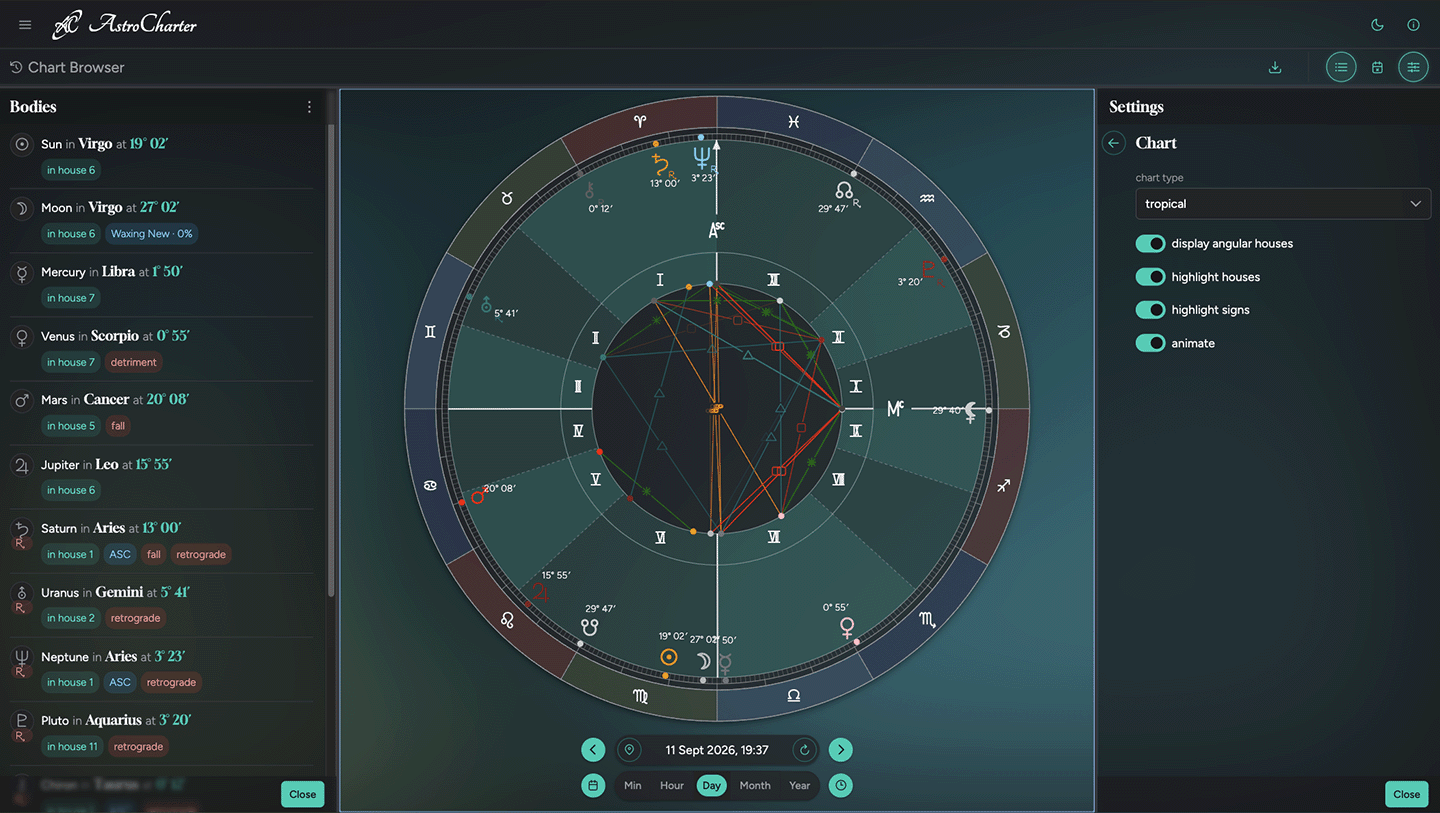
AstroCharter is a modern astrology charting application that uses Zodiac Fonts for crisp, scalable symbol rendering across tropical, sidereal, and other chart views.
Choose your integration style
Quick start
Pick the approach that fits your stack — copy the raw SVG files straight in, or install the package and use the bundled icon font.
Install the package once and use the icon font, SVGs, or Sass source directly from node_modules — versioned, tree-shakeable, works with any bundler.
1. Install the package
npm install zodiacfonts2. Import the stylesheet or Sass source
Use the plain CSS import for most projects. Sass projects can use @use 'zodiacfonts/scss' and override $zf-font-path to point to a self-hosted copy of the font.
/* Vite, webpack, Rollup — the bundler copies the font automatically */
    import 'zodiacfonts/css';

/* Sass/SCSS — override the font path before importing if needed */
    $zf-font-path: '/your/assets/fonts/ZodiacFontFREE.woff2';
    @use 'zodiacfonts/scss';

/* Angular CLI — copy the font via angular.json assets glob first: */
   { "glob": "ZodiacFontFREE.woff2",
     "input": "node_modules/zodiacfonts/fonts",
     "output": "assets/zodiacfonts" }
/* then override the path in SCSS: */
   $zf-font-path: '/assets/zodiacfonts/ZodiacFontFREE.woff2';
   @use 'zodiacfonts/scss';
3. Optional: add the companion script
Call checkZodiacGlyphs() inside your mount lifecycle to get automatic console warnings for any PRO glyph classes used without the PRO font loaded.
<!-- Optional: auto-warns in the browser console if a PRO glyph class
     is used without the PRO font loaded. No configuration needed. -->
<script type="module" src="https://cdn.jsdelivr.net/npm/zodiacfonts@latest/js/zodiac-fonts.min.js"></script>

<!-- SPA (React, Vue, Angular) — call inside your mount lifecycle instead -->
import { checkZodiacGlyphs } from 'zodiacfonts/js';
The stylesheet ships CSS classes for all 101 glyphs — 55 FREE and 46 PRO stubs. You can write the full HTML today; PRO glyphs will render once you add the PRO font. Full folder structure, SVG usage, and framework snippets are in the repository README.
Live colour preview
Every free SVG is drawn with stroke="currentColor", so it adapts to its surroundings with a single CSS property — no editing required. Pick a colour to see it live.
These SVGs use currentColor, so they adapt to any colour you choose.
Pro integrationcoming soon
Pro ships the complete collection as real, installable font families. Every glyph sits at a stable Unicode Private Use Area code point, so you register the families with @font-face once and render any symbol by its code point — no per-symbol SVG markup needed.
/* Pro: register the font families, then place glyphs by their PUA code point */
@font-face {
  font-family: "Zodiac Sans";
  src: url("fonts/zodiac-sans-regular.woff2") format("woff2");
  font-weight: 400;
  font-display: swap;
}
@font-face {
  font-family: "Zodiac Sans";
  src: url("fonts/zodiac-sans-bold.woff2") format("woff2");
  font-weight: 700;
  font-display: swap;
}
@font-face {
  font-family: "Zodiac Slab";
  src: url("fonts/zodiac-slab-regular.woff2") format("woff2");
  font-weight: 400;
  font-display: swap;
}

.chart-glyph { font-family: "Zodiac Sans"; }

/* Each glyph lives at a stable Private Use Area code point */
.chart-glyph--aries::before { content: "\e000"; }  /* Aries */
.chart-glyph--sun::before   { content: "\e101"; }  /* Sun   */
.chart-glyph--moon::before  { content: "\e102"; }  /* Moon  */
Every glyph sits at a stable Private Use Area code point. The free 55 are documented in the repository README. The complete Pro character map ships with your download.